<?xml version="1.0" encoding="utf-8"?><feed xmlns="http://www.w3.org/2005/Atom" ><generator uri="https://jekyllrb.com/" version="3.10.0">Jekyll</generator><link href="http://mvinetwork.co.uk/feed.xml" rel="self" type="application/atom+xml" /><link href="http://mvinetwork.co.uk/" rel="alternate" type="text/html" /><updated>2026-05-09T22:23:45+00:00</updated><id>http://mvinetwork.co.uk/feed.xml</id><title type="html">MVI</title><subtitle>Barnaby Smith&apos;s personal dev blog.</subtitle><author><name>Barnaby Smith</name></author><entry><title type="html">Design Principles for VR Games</title><link href="http://mvinetwork.co.uk/2023/05/26/design-principles-for-vr-games" rel="alternate" type="text/html" title="Design Principles for VR Games" /><published>2023-05-26T00:00:00+00:00</published><updated>2023-05-26T00:00:00+00:00</updated><id>http://mvinetwork.co.uk/2023/05/26/design-principles-for-vr-games</id><content type="html" xml:base="http://mvinetwork.co.uk/2023/05/26/design-principles-for-vr-games"><![CDATA[<p>This talk was originally given at University of Warwick.</p>

<embed type="application/pdf" src="/Talks/DesignPrinciplesForVRGames.pdf" width="100%" height="400" />]]></content><author><name>Barnaby Smith</name></author><category term="Other" /><summary type="html"><![CDATA[This talk was originally given at University of Warwick.]]></summary></entry><entry><title type="html">Notes for Unity Docs, 3 years on</title><link href="http://mvinetwork.co.uk/2020/12/01/notes-for-unity-docs-3-years-on" rel="alternate" type="text/html" title="Notes for Unity Docs, 3 years on" /><published>2020-12-01T00:00:00+00:00</published><updated>2020-12-01T00:00:00+00:00</updated><id>http://mvinetwork.co.uk/2020/12/01/notes-for-unity-docs-3-years-on</id><content type="html" xml:base="http://mvinetwork.co.uk/2020/12/01/notes-for-unity-docs-3-years-on"><![CDATA[<p><img src="/Images/NotesForUnity3YearsOn.png" /></p>

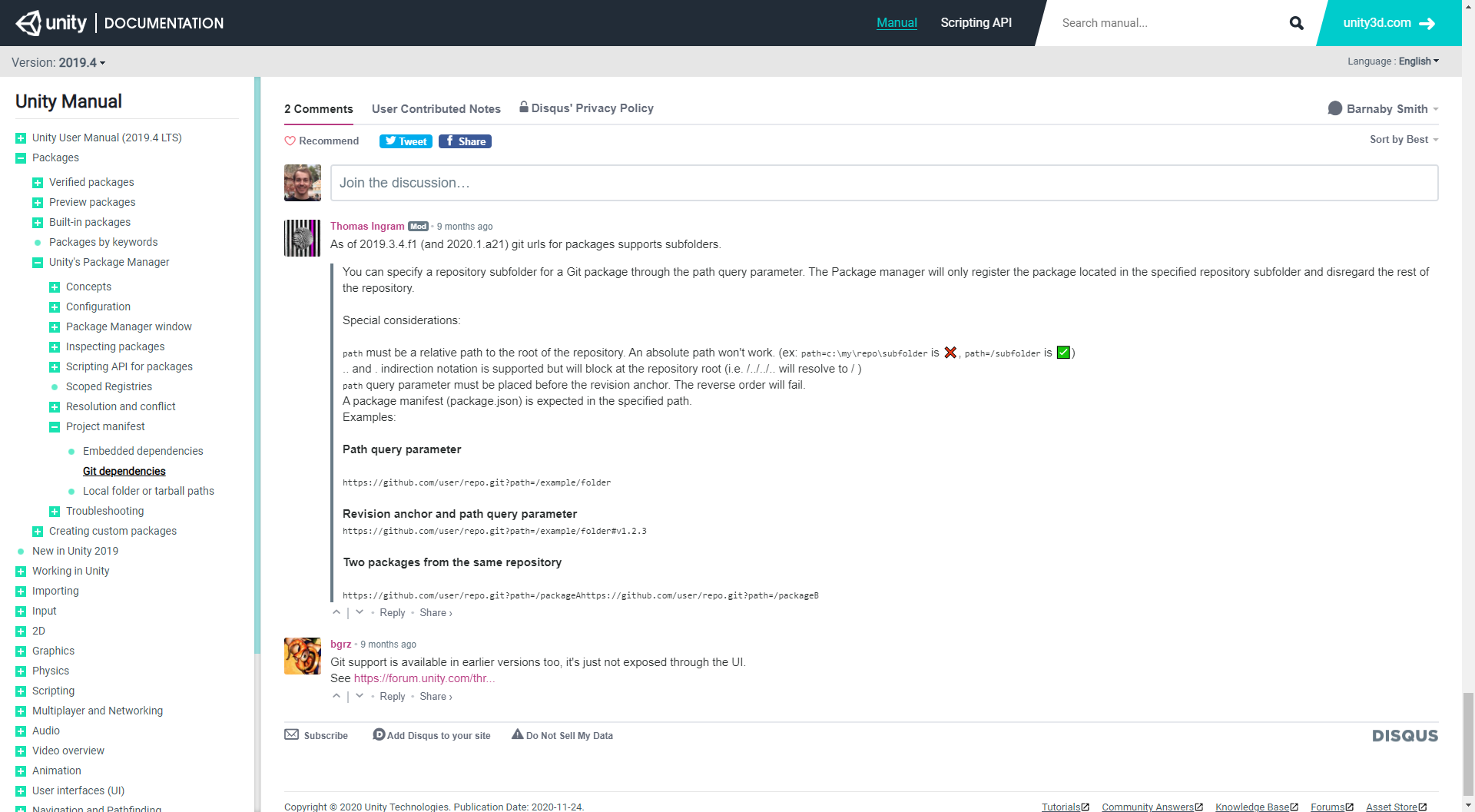
<p>It’s been a little over 3 years since I created a Chrome extension for shared notes on Unity Docs pages. In that time 465 notes have been posted by 111 different users! And every single note adds something meaningful to those pages, whether it’s a usage example, undocumented gotcha, example output, or a detailed writeup on a topic.</p>

<p>The notes are moderated by myself and my good friend <a href="https://vertx.xyz/">Thom Ingram</a>, but we’ve been fortunate that very little moderation needs to take place. The quality of the notes in particular are very high and it’s a fantastic feeling when working on a problem to load up the doc page and see a helpful comment that saves you hours of time.</p>

<p>Thank you to everyone who has posted a note or downloaded the extension. I’m also thankful for the lovely Unity Docs team for their support and I’m looking forward to reaching 500 notes soon!</p>

<p>If you’re a Chrome user and haven’t got the Chrome extension already you can download it <a href="https://chrome.google.com/webstore/detail/user-contributed-notes-fo/fchdfdnnpkphopmdaochdfnmcahndmnb">here</a>.</p>]]></content><author><name>Barnaby Smith</name></author><category term="Other" /><summary type="html"><![CDATA[]]></summary></entry><entry><title type="html">Introducing User Contributed Notes for Unity Docs</title><link href="http://mvinetwork.co.uk/2017/08/21/introducing-user-contributed-notes-for-unity-docs" rel="alternate" type="text/html" title="Introducing User Contributed Notes for Unity Docs" /><published>2017-08-21T00:00:00+00:00</published><updated>2017-08-21T00:00:00+00:00</updated><id>http://mvinetwork.co.uk/2017/08/21/introducing-user-contributed-notes-for-unity-docs</id><content type="html" xml:base="http://mvinetwork.co.uk/2017/08/21/introducing-user-contributed-notes-for-unity-docs"><![CDATA[<p><img src="/Images/UserContributedNotes.png.png" /></p>

<p>After years of wanting to be able to post and see user notes (such as examples, gotchas, additional detail) on Unity Docs I finally bit the bullet and wrote a browser extension for Chrome that allows you to comment on individual pages – <a href="https://chrome.google.com/webstore/detail/user-contributed-notes-fo/fchdfdnnpkphopmdaochdfnmcahndmnb">Chrome</a></p>]]></content><author><name>Barnaby Smith</name></author><category term="Other" /><summary type="html"><![CDATA[]]></summary></entry><entry><title type="html">5 Years Of #UnityTips</title><link href="http://mvinetwork.co.uk/2017/05/24/5-years-of-unitytips" rel="alternate" type="text/html" title="5 Years Of #UnityTips" /><published>2017-05-24T00:00:00+00:00</published><updated>2017-05-24T00:00:00+00:00</updated><id>http://mvinetwork.co.uk/2017/05/24/5-years-of-unitytips</id><content type="html" xml:base="http://mvinetwork.co.uk/2017/05/24/5-years-of-unitytips"><![CDATA[<p>5 years ago I set up a webpage which runs several times a day and pulls out all tweets using the following hashtags:</p>

<p>#UnityTip
#UnityTips
#Unity3DTip
#Unity3DTips</p>

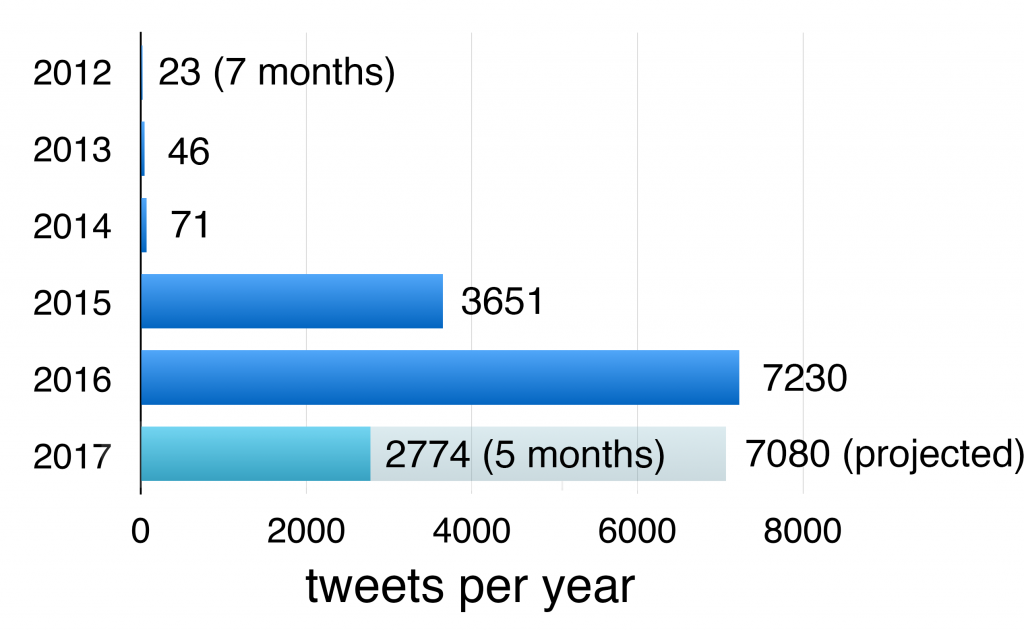
<p>At the time there wasn’t a standardised hashtag as #UnityTips has become now, so all of the four above were in use.</p>

<p>After a slow start the hashtag really exploded when Unity started #UnityTips Tuesday in May 2015 and that hashtag became the de facto standard.</p>

<p><img src="/Images/5YearsUnityTips.png" /></p>

<p>To celebrate the 5 year mark I’ve gone through the database and created a list of 25 of the best #UnityTips that Unity developers have shared.</p>

<p>But first, let’s start with the most popular Unity Tip of all time, with over 7000 retweets!</p>

<h3 id="how-to-fix-z-fighting">How to fix z-fighting</h3>

<blockquote class="twitter-tweet"><p lang="en" dir="ltr">How to fix Z-fighting <a href="https://twitter.com/hashtag/unitytips?src=hash&amp;ref_src=twsrc%5Etfw">#unitytips</a> <a href="https://t.co/JXS47UDrDO">pic.twitter.com/JXS47UDrDO</a></p>&mdash; Freya Holmér (@FreyaHolmer) <a href="https://twitter.com/FreyaHolmer/status/799602767081848832?ref_src=twsrc%5Etfw">November 18, 2016</a></blockquote>
<script async="" src="https://platform.twitter.com/widgets.js" charset="utf-8"></script>

<p>And onto our 25 top tips:</p>

<h3 id="inspector-locking">Inspector Locking</h3>

<blockquote class="twitter-tweet"><p lang="en" dir="ltr"><a href="https://twitter.com/hashtag/unitytips?src=hash&amp;ref_src=twsrc%5Etfw">#unitytips</a> Lock the inspector using the lock icon. You will be able to drag and drop objects into it.<a href="https://twitter.com/hashtag/gamedev?src=hash&amp;ref_src=twsrc%5Etfw">#gamedev</a> <a href="https://twitter.com/hashtag/indiedev?src=hash&amp;ref_src=twsrc%5Etfw">#indiedev</a> <a href="https://twitter.com/hashtag/unity3d?src=hash&amp;ref_src=twsrc%5Etfw">#unity3d</a> <a href="https://twitter.com/hashtag/indiegame?src=hash&amp;ref_src=twsrc%5Etfw">#indiegame</a> <a href="https://t.co/4y1GMXKS7d">pic.twitter.com/4y1GMXKS7d</a></p>&mdash; Verusoft (@verusoft) <a href="https://twitter.com/verusoft/status/841622408909987844?ref_src=twsrc%5Etfw">March 14, 2017</a></blockquote>
<script async="" src="https://platform.twitter.com/widgets.js" charset="utf-8"></script>

<h3 id="see-internal-state-with-debug-inspector">See internal state with Debug Inspector</h3>

<blockquote class="twitter-tweet"><p lang="en" dir="ltr">Don&#39;t make class members public to see them in the Inspector - use the Debug Inspector to see private members.<a href="https://twitter.com/hashtag/gamedev?src=hash&amp;ref_src=twsrc%5Etfw">#gamedev</a> <a href="https://twitter.com/hashtag/indiedev?src=hash&amp;ref_src=twsrc%5Etfw">#indiedev</a> <a href="https://twitter.com/hashtag/unitytips?src=hash&amp;ref_src=twsrc%5Etfw">#unitytips</a> <a href="https://t.co/1m0VcPYnOw">pic.twitter.com/1m0VcPYnOw</a></p>&mdash; Joe Kelly (@udonengineering) <a href="https://twitter.com/udonengineering/status/778297808793120768?ref_src=twsrc%5Etfw">September 20, 2016</a></blockquote>
<script async="" src="https://platform.twitter.com/widgets.js" charset="utf-8"></script>

<h3 id="add-additional-inspectors">Add additional inspectors</h3>

<blockquote class="twitter-tweet"><p lang="en" dir="ltr">You can open two inspectors which is useful for comparing values and such. <a href="https://twitter.com/hashtag/unitytips?src=hash&amp;ref_src=twsrc%5Etfw">#unitytips</a> <a href="https://twitter.com/hashtag/gamedev?src=hash&amp;ref_src=twsrc%5Etfw">#gamedev</a> <a href="https://twitter.com/hashtag/indiedev?src=hash&amp;ref_src=twsrc%5Etfw">#indiedev</a> <a href="https://t.co/WARlJTJXgZ">pic.twitter.com/WARlJTJXgZ</a></p>&mdash; Hjalte Tagmose 🇺🇦 (@hjaltetagmose) <a href="https://twitter.com/hjaltetagmose/status/803565087155961856?ref_src=twsrc%5Etfw">November 29, 2016</a></blockquote>
<script async="" src="https://platform.twitter.com/widgets.js" charset="utf-8"></script>

<h3 id="many-fields-support-maths-calculations">Many fields support maths calculations</h3>

<blockquote class="twitter-tweet"><p lang="en" dir="ltr"><a href="https://twitter.com/hashtag/unityTips?src=hash&amp;ref_src=twsrc%5Etfw">#unityTips</a> You can enter calculations into numeric inspector fields: <a href="https://twitter.com/unity3d?ref_src=twsrc%5Etfw">@unity3d</a> <a href="https://twitter.com/hashtag/Unity3d?src=hash&amp;ref_src=twsrc%5Etfw">#Unity3d</a> <a href="http://t.co/1ilIT4JBZK">pic.twitter.com/1ilIT4JBZK</a></p>&mdash; Ben Pitt (@robotduck) <a href="https://twitter.com/robotduck/status/600663317888299008?ref_src=twsrc%5Etfw">May 19, 2015</a></blockquote>
<script async="" src="https://platform.twitter.com/widgets.js" charset="utf-8"></script>

<h3 id="better-understand-colour-blindness-with-this-image-effect">Better understand colour blindness with this image effect</h3>

<blockquote class="twitter-tweet"><p lang="en" dir="ltr">How to simulate colour blindness in <a href="https://twitter.com/unity3d?ref_src=twsrc%5Etfw">@unity3d</a> for accessibility testing<a href="https://t.co/Fe6KTOwT4a">https://t.co/Fe6KTOwT4a</a><a href="https://twitter.com/hashtag/gamedev?src=hash&amp;ref_src=twsrc%5Etfw">#gamedev</a> <a href="https://twitter.com/hashtag/unitytips?src=hash&amp;ref_src=twsrc%5Etfw">#unitytips</a> <a href="https://t.co/tlWUNvoAxj">pic.twitter.com/tlWUNvoAxj</a></p>&mdash; Alan Zucconi (@AlanZucconi) <a href="https://twitter.com/AlanZucconi/status/677092037708115968?ref_src=twsrc%5Etfw">December 16, 2015</a></blockquote>
<script async="" src="https://platform.twitter.com/widgets.js" charset="utf-8"></script>

<h3 id="layers-and-tags-support-nesting">Layers and tags support nesting</h3>

<blockquote class="twitter-tweet"><p lang="en" dir="ltr">It&#39;s <a href="https://twitter.com/hashtag/unitytips?src=hash&amp;ref_src=twsrc%5Etfw">#unitytips</a> Tuesday: Create submenus in the tags &amp; layers dropdown by using a slash in the name! <a href="https://twitter.com/unity3d?ref_src=twsrc%5Etfw">@unity3d</a> <a href="https://t.co/wBYT3bxYOC">pic.twitter.com/wBYT3bxYOC</a></p>&mdash; Ben Pitt (@robotduck) <a href="https://twitter.com/robotduck/status/664133990354436098?ref_src=twsrc%5Etfw">November 10, 2015</a></blockquote>
<script async="" src="https://platform.twitter.com/widgets.js" charset="utf-8"></script>

<h3 id="profiler-supports-reordering-groups">Profiler supports reordering groups</h3>

<blockquote class="twitter-tweet"><p lang="en" dir="ltr">Retweet if you didn’t know you could do this. <a href="https://twitter.com/hashtag/unity3d?src=hash&amp;ref_src=twsrc%5Etfw">#unity3d</a> <a href="https://twitter.com/hashtag/unitytips?src=hash&amp;ref_src=twsrc%5Etfw">#unitytips</a> <a href="https://twitter.com/hashtag/profiler?src=hash&amp;ref_src=twsrc%5Etfw">#profiler</a> <a href="https://twitter.com/hashtag/gamedev?src=hash&amp;ref_src=twsrc%5Etfw">#gamedev</a> <a href="https://t.co/wdSjcCrCv8">pic.twitter.com/wdSjcCrCv8</a></p>&mdash; Valentin Simonov (@valyard) <a href="https://twitter.com/valyard/status/827999180979179520?ref_src=twsrc%5Etfw">February 4, 2017</a></blockquote>
<script async="" src="https://platform.twitter.com/widgets.js" charset="utf-8"></script>

<h3 id="export-substances-into-textures-to-permanently-bake-the-substances-in-editor">Export Substances into textures to permanently bake the substances in editor</h3>

<p>Original Tweet Deleted: To convert a Substance to Standard Material in #Unity3d: From Inspector, select Cog Icon → Export Bitmaps</p>

<h3 id="alt-click-to-expandcollapse-recursively-in-tree-views">Alt click to expand/collapse recursively in tree views</h3>

<blockquote class="twitter-tweet"><p lang="en" dir="ltr">Got a lot of nested GameObjects? <a href="https://twitter.com/hashtag/unitytips?src=hash&amp;ref_src=twsrc%5Etfw">#unitytips</a> Use alt + left mouse button to collapse or uncollapse all child objects at once! <a href="https://twitter.com/hashtag/unity3d?src=hash&amp;ref_src=twsrc%5Etfw">#unity3d</a> <a href="https://t.co/NgGKB4xPyj">pic.twitter.com/NgGKB4xPyj</a></p>&mdash; Lukas Steinmetz (@drspoik) <a href="https://twitter.com/drspoik/status/798467014931128320?ref_src=twsrc%5Etfw">November 15, 2016</a></blockquote>
<script async="" src="https://platform.twitter.com/widgets.js" charset="utf-8"></script>

<h3 id="use-contextmenu-attribute-to-add-inspector-methods-to-your-own-components">Use ContextMenu attribute to add inspector methods to your own components</h3>

<p>Original Tweet Deleted: Use the ContextMenu Attribute to execute methods in the editor.</p>

<h3 id="use-menuitem-with-context-to-add-inspector-methods-to-built-in-components">Use [MenuItem] with CONTEXT to add inspector methods to built in components</h3>

<blockquote class="twitter-tweet"><p lang="en" dir="ltr">[MenuItem (&quot;CONTEXT/Rigidbody/Lala&quot;)] adds a menu item called &quot;Lala&quot; to a Rigidbody&#39;s context menu | <a href="http://t.co/EZC3YSGqOJ">http://t.co/EZC3YSGqOJ</a></p>&mdash; Unity Tips &amp; Tricks (@tips4unity) <a href="https://twitter.com/tips4unity/status/611413133350039552?ref_src=twsrc%5Etfw">June 18, 2015</a></blockquote>
<script async="" src="https://platform.twitter.com/widgets.js" charset="utf-8"></script>

<h3 id="use-createassetmenu-to-add-your-scriptable-object-to-the-create-menu-avoiding-boilerplate-creation-code">Use [CreateAssetMenu] to add your scriptable object to the Create/ menu, avoiding boilerplate creation code</h3>

<blockquote class="twitter-tweet"><p lang="en" dir="ltr">Just found you can now get your ScriptableObject into the create menu with just a single attribute! <a href="https://twitter.com/hashtag/unitytips?src=hash&amp;ref_src=twsrc%5Etfw">#unitytips</a> \o/ <a href="https://t.co/dqSQSnK5R5">pic.twitter.com/dqSQSnK5R5</a></p>&mdash; Ben Pitt (@robotduck) <a href="https://twitter.com/robotduck/status/679631704793964544?ref_src=twsrc%5Etfw">December 23, 2015</a></blockquote>
<script async="" src="https://platform.twitter.com/widgets.js" charset="utf-8"></script>

<h3 id="add-custom-icons-to-a-script-and-their-instances-through-the-inspector">Add custom icons to a script and their instances through the inspector</h3>

<blockquote class="twitter-tweet"><p lang="en" dir="ltr">Give your scripts some love with a custom icon! <a href="https://twitter.com/hashtag/unitytips?src=hash&amp;ref_src=twsrc%5Etfw">#unitytips</a> <a href="https://t.co/5nqikcKVJp">pic.twitter.com/5nqikcKVJp</a></p>&mdash; Karl Jones (@KarlJamesJones) <a href="https://twitter.com/KarlJamesJones/status/684329025385410561?ref_src=twsrc%5Etfw">January 5, 2016</a></blockquote>
<script async="" src="https://platform.twitter.com/widgets.js" charset="utf-8"></script>

<h3 id="alternatively-set-icons-for-components-by-using-the-gizmos-folder">Alternatively set icons for components by using the Gizmos/ folder</h3>

<blockquote class="twitter-tweet"><p lang="en" dir="ltr">You can make icons for your custom ScriptableObjects: put &quot;ClassName Icon.png&quot; in a folder called Gizmos <a href="https://twitter.com/hashtag/unitytips?src=hash&amp;ref_src=twsrc%5Etfw">#unitytips</a> <a href="https://t.co/UgzzVuBkao">pic.twitter.com/UgzzVuBkao</a></p>&mdash; Graeme Borland (@graebor) <a href="https://twitter.com/graebor/status/679344916539961344?ref_src=twsrc%5Etfw">December 22, 2015</a></blockquote>
<script async="" src="https://platform.twitter.com/widgets.js" charset="utf-8"></script>

<h3 id="restore-scenes-after-a-crash">Restore scenes after a crash</h3>

<blockquote class="twitter-tweet"><p lang="en" dir="ltr">You can restore unsaved scene after Unity crash <a href="https://t.co/ToO8PDgbUR">https://t.co/ToO8PDgbUR</a> <a href="https://twitter.com/hashtag/unity3d?src=hash&amp;ref_src=twsrc%5Etfw">#unity3d</a> <a href="https://twitter.com/hashtag/unitydev?src=hash&amp;ref_src=twsrc%5Etfw">#unitydev</a> <a href="https://twitter.com/hashtag/unitytips?src=hash&amp;ref_src=twsrc%5Etfw">#unitytips</a> <a href="https://twitter.com/hashtag/gamedev?src=hash&amp;ref_src=twsrc%5Etfw">#gamedev</a> <a href="https://twitter.com/hashtag/indiedev?src=hash&amp;ref_src=twsrc%5Etfw">#indiedev</a></p>&mdash; The Knights of U (@theknightsofu) <a href="https://twitter.com/theknightsofu/status/851736852218466304?ref_src=twsrc%5Etfw">April 11, 2017</a></blockquote>
<script async="" src="https://platform.twitter.com/widgets.js" charset="utf-8"></script>

<h3 id="use-reset-to-automatically-hook-up-references-or-state">Use Reset() to automatically hook up references or state</h3>

<blockquote class="twitter-tweet"><p lang="en" dir="ltr">Use Reset() to auto-populate your inspector, reduces the amount of drag and drops to do, saves lives <a href="https://twitter.com/hashtag/unitytips?src=hash&amp;ref_src=twsrc%5Etfw">#unitytips</a> <a href="https://t.co/RHqlOookmv">pic.twitter.com/RHqlOookmv</a></p>&mdash; Mark Hogan | Developing Battlenauts (@markeahogan) <a href="https://twitter.com/markeahogan/status/750277247576182784?ref_src=twsrc%5Etfw">July 5, 2016</a></blockquote>
<script async="" src="https://platform.twitter.com/widgets.js" charset="utf-8"></script>

<h3 id="hidedisable-dependent-fields-in-inspector-with-brecht-lecluyses-attribute">Hide/disable dependent fields in Inspector with Brecht Lecluyse’s attribute</h3>

<blockquote class="twitter-tweet"><p lang="en" dir="ltr">How to hide or disable inspector properties in <a href="https://twitter.com/unity3d?ref_src=twsrc%5Etfw">@unity3d</a> using a bool. <a href="https://t.co/d8GZe93t8E">https://t.co/d8GZe93t8E</a> <a href="https://twitter.com/hashtag/gamedev?src=hash&amp;ref_src=twsrc%5Etfw">#gamedev</a> <a href="https://twitter.com/hashtag/unitytips?src=hash&amp;ref_src=twsrc%5Etfw">#unitytips</a> <a href="https://t.co/TBmuM3c9nV">pic.twitter.com/TBmuM3c9nV</a></p>&mdash; Glowfish Interactive (@GlowfishInt) <a href="https://twitter.com/GlowfishInt/status/714779878680371200?ref_src=twsrc%5Etfw">March 29, 2016</a></blockquote>
<script async="" src="https://platform.twitter.com/widgets.js" charset="utf-8"></script>

<h3 id="skyblades-scriptexecutionorder-attribute-allows-you-to-set-order-programatically">Skyblade’s ScriptExecutionOrder attribute allows you to set order programatically</h3>

<blockquote class="twitter-tweet"><p lang="en" dir="ltr">Set script execution order explicitly in code with custom attribute: <a href="https://t.co/B6AtOIrs8W">https://t.co/B6AtOIrs8W</a><a href="https://twitter.com/hashtag/unitytips?src=hash&amp;ref_src=twsrc%5Etfw">#unitytips</a> <a href="https://twitter.com/hashtag/unity3d?src=hash&amp;ref_src=twsrc%5Etfw">#unity3d</a> <a href="https://t.co/Tekn7wR0qs">pic.twitter.com/Tekn7wR0qs</a></p>&mdash; Skyblade (@Skybladev2) <a href="https://twitter.com/Skybladev2/status/707164901542895616?ref_src=twsrc%5Etfw">March 8, 2016</a></blockquote>
<script async="" src="https://platform.twitter.com/widgets.js" charset="utf-8"></script>

<h3 id="set-audiosource-pitch-to-negative-to-play-backwards">Set AudioSource pitch to negative to play backwards</h3>

<blockquote class="twitter-tweet"><p lang="en" dir="ltr">Set an AudioSource&#39;s pitch property to a negative value to play it backwards!<a href="https://twitter.com/hashtag/gamedev?src=hash&amp;ref_src=twsrc%5Etfw">#gamedev</a> <a href="https://twitter.com/hashtag/gameaudio?src=hash&amp;ref_src=twsrc%5Etfw">#gameaudio</a> <a href="https://twitter.com/hashtag/unitytips?src=hash&amp;ref_src=twsrc%5Etfw">#unitytips</a> <a href="https://t.co/UAH36pvkwu">pic.twitter.com/UAH36pvkwu</a></p>&mdash; Joe Kelly (@udonengineering) <a href="https://twitter.com/udonengineering/status/762928208006164480?ref_src=twsrc%5Etfw">August 9, 2016</a></blockquote>
<script async="" src="https://platform.twitter.com/widgets.js" charset="utf-8"></script>

<h3 id="alt-drag-a-scene-into-the-hierarchy-to-add-it-an-unloaded-state">Alt drag a scene into the hierarchy to add it an unloaded state</h3>

<blockquote class="twitter-tweet"><p lang="en" dir="ltr"><a href="https://twitter.com/hashtag/unitytips?src=hash&amp;ref_src=twsrc%5Etfw">#unitytips</a> from the future! in 5.3, alt-dragging scenes into the hierarchy adds them in &quot;unloaded&quot; state :) <a href="https://twitter.com/unity3d?ref_src=twsrc%5Etfw">@unity3d</a> <a href="https://t.co/nVeGYFc9DS">https://t.co/nVeGYFc9DS</a></p>&mdash; Ben Pitt (@robotduck) <a href="https://twitter.com/robotduck/status/671757603106652166?ref_src=twsrc%5Etfw">December 1, 2015</a></blockquote>
<script async="" src="https://platform.twitter.com/widgets.js" charset="utf-8"></script>

<h3 id="use-editorcreateeditor-to-embed-editors-for-scriptable-objects-or-other-objects">Use Editor.CreateEditor() to embed editors for scriptable objects or other objects</h3>

<blockquote class="twitter-tweet"><p lang="en" dir="ltr">Use Editor.CreateEditor to draw inspectors inside other custom inspectors <a href="https://twitter.com/hashtag/unitytips?src=hash&amp;ref_src=twsrc%5Etfw">#unitytips</a> <a href="https://t.co/E5AlOJ4CNC">https://t.co/E5AlOJ4CNC</a> <a href="https://t.co/Ll88D29F5x">pic.twitter.com/Ll88D29F5x</a></p>&mdash; Edward Rowe 🌟 Sparklite (@edwardlrowe) <a href="https://twitter.com/edwardlrowe/status/770706139927482370?ref_src=twsrc%5Etfw">August 30, 2016</a></blockquote>
<script async="" src="https://platform.twitter.com/widgets.js" charset="utf-8"></script>

<h3 id="create-colour-preset-libraries-in-project-to-share-them-in-source-control">Create Colour Preset Libraries in Project to share them in source control</h3>

<blockquote class="twitter-tweet"><p lang="en" dir="ltr"><a href="https://twitter.com/hashtag/unitytips?src=hash&amp;ref_src=twsrc%5Etfw">#unitytips</a> Save colour libraries to project folder to check into your repo to share with the team. Good find, Mark! <a href="http://t.co/41cmNqhEcQ">pic.twitter.com/41cmNqhEcQ</a></p>&mdash; Louard 🎲🎮✏️ (@LouardOnGames) <a href="https://twitter.com/LouardOnGames/status/653904729609740288?ref_src=twsrc%5Etfw">October 13, 2015</a></blockquote>
<script async="" src="https://platform.twitter.com/widgets.js" charset="utf-8"></script>

<h3 id="use-copypaste-component-to-copy-settings-from-play-mode-to-edit-time">Use Copy/Paste Component to copy settings from play mode to edit time</h3>

<blockquote class="twitter-tweet"><p lang="en" dir="ltr">In play mode and you want to save your settings, use the cog to copy the component, exit play, then paste.<a href="https://twitter.com/hashtag/unitytips?src=hash&amp;ref_src=twsrc%5Etfw">#unitytips</a> <a href="https://t.co/Gw5eOLNiRm">pic.twitter.com/Gw5eOLNiRm</a></p>&mdash; Josh Naylor (@JoshNaylor) <a href="https://twitter.com/JoshNaylor/status/762921753920372736?ref_src=twsrc%5Etfw">August 9, 2016</a></blockquote>
<script async="" src="https://platform.twitter.com/widgets.js" charset="utf-8"></script>

<h3 id="save-and-restore-your-selection-with-these-shortcuts">Save and restore your selection with these shortcuts</h3>

<blockquote class="twitter-tweet"><p lang="en" dir="ltr">Save a complex <a href="https://twitter.com/unity3d?ref_src=twsrc%5Etfw">@unity3d</a> Hierarchy selection, then load it back to quickly toggle assets on/off <a href="https://twitter.com/hashtag/unitytips?src=hash&amp;ref_src=twsrc%5Etfw">#unitytips</a> <a href="https://twitter.com/hashtag/biobeasts?src=hash&amp;ref_src=twsrc%5Etfw">#biobeasts</a> <a href="https://t.co/02QxO0eJmr">pic.twitter.com/02QxO0eJmr</a></p>&mdash; BioBeasts (@BioBeasts) <a href="https://twitter.com/BioBeasts/status/732618870910029824?ref_src=twsrc%5Etfw">May 17, 2016</a></blockquote>
<script async="" src="https://platform.twitter.com/widgets.js" charset="utf-8"></script>

<h3 id="use-the-editoronly-tag-to-strip-out-objects-at-build-time">Use the EditorOnly tag to strip out objects at build time</h3>

<blockquote class="twitter-tweet"><p lang="en" dir="ltr">Use ‘EditorOnly’ Tag for your Debug/Editor Objects and they will be remove automatically in your Build <a href="https://twitter.com/hashtag/UnityTips?src=hash&amp;ref_src=twsrc%5Etfw">#UnityTips</a> <a href="https://twitter.com/hashtag/GameDev?src=hash&amp;ref_src=twsrc%5Etfw">#GameDev</a> <a href="https://twitter.com/hashtag/IndieDev?src=hash&amp;ref_src=twsrc%5Etfw">#IndieDev</a> <a href="https://t.co/HqeFu0SZVX">pic.twitter.com/HqeFu0SZVX</a></p>&mdash; NIC😋PLV (@nicoplv) <a href="https://twitter.com/nicoplv/status/867000960622759938?ref_src=twsrc%5Etfw">May 23, 2017</a></blockquote>
<script async="" src="https://platform.twitter.com/widgets.js" charset="utf-8"></script>

<p>Thanks for reading these tips, I hope they were useful and remember to tweet your own tips using #UnityTips</p>

<p>For more Unity tips and tricks be sure to follow me on Twitter:</p>

<p>Follow <a href="https://x.com/mvinetwork">@mvinetwork</a></p>]]></content><author><name>Barnaby Smith</name></author><category term="Other" /><summary type="html"><![CDATA[5 years ago I set up a webpage which runs several times a day and pulls out all tweets using the following hashtags:]]></summary></entry><entry><title type="html">Procedural Planet Rendering</title><link href="http://mvinetwork.co.uk/2014/06/05/procedural-planet-rendering" rel="alternate" type="text/html" title="Procedural Planet Rendering" /><published>2014-06-05T00:00:00+00:00</published><updated>2014-06-05T00:00:00+00:00</updated><id>http://mvinetwork.co.uk/2014/06/05/procedural-planet-rendering</id><content type="html" xml:base="http://mvinetwork.co.uk/2014/06/05/procedural-planet-rendering"><![CDATA[<p>This talk was originally given at LUUG 29 (London Unity User Group) at University of Greenwich.</p>

<embed type="application/pdf" src="/permanent/planetRendering/ProceduralPlanetRendering.pdf" width="100%" height="400" />]]></content><author><name>Barnaby Smith</name></author><category term="Other" /><summary type="html"><![CDATA[This talk was originally given at LUUG 29 (London Unity User Group) at University of Greenwich.]]></summary></entry><entry><title type="html">Colour Code Snippets</title><link href="http://mvinetwork.co.uk/2013/05/27/colour-code-snippets" rel="alternate" type="text/html" title="Colour Code Snippets" /><published>2013-05-27T00:00:00+00:00</published><updated>2013-05-27T00:00:00+00:00</updated><id>http://mvinetwork.co.uk/2013/05/27/colour-code-snippets</id><content type="html" xml:base="http://mvinetwork.co.uk/2013/05/27/colour-code-snippets"><![CDATA[<p>I’ve previously produced a number of mod tools for Dune 2000 that convert colours from various formats to 24 bit and back. Although most of the source code is already online, I thought I’d share the colour conversion C# source code in one place.</p>

<h2 id="convert-15-bit-high-colour-to-24-bit-true-colour">Convert 15 bit high colour to 24 bit true colour</h2>

<p>This converts 15 bit (with 1 bit padding) colour to 24 bit, by first extracting the red, green and blue channels. In 15 bit colour, each channel has 5 bits meaning 25 = 32 permutations, but we want 8 bit colour for each channel which is 28 = 256 permutations, so we divide by the highest 5 bit value and multiply by the highest 8 bit value to convert the range from 0-31 to 0-255.</p>

<figure class="highlight"><pre><code class="language-csharp" data-lang="csharp"><span class="k">private</span> <span class="n">Color</span> <span class="nf">ConvertColor</span><span class="p">(</span><span class="n">UInt16</span> <span class="n">colour</span><span class="p">)</span>
<span class="p">{</span>
    <span class="c1">// bits = XRRRRRGGGGGBBBBB</span>
    <span class="kt">byte</span> <span class="n">red</span> <span class="p">=</span> <span class="p">(</span><span class="kt">byte</span><span class="p">)((</span><span class="n">colour</span> <span class="p">&gt;&gt;</span> <span class="m">10</span><span class="p">)</span> <span class="p">&amp;</span> <span class="m">0x1f</span><span class="p">);</span>
    <span class="kt">byte</span> <span class="n">green</span> <span class="p">=</span> <span class="p">(</span><span class="kt">byte</span><span class="p">)((</span><span class="n">colour</span> <span class="p">&gt;&gt;</span> <span class="m">5</span><span class="p">)</span> <span class="p">&amp;</span> <span class="m">0x1f</span><span class="p">);</span>
    <span class="kt">byte</span> <span class="n">blue</span> <span class="p">=</span> <span class="p">(</span><span class="kt">byte</span><span class="p">)(</span><span class="n">colour</span> <span class="p">&amp;</span> <span class="m">0x1f</span><span class="p">);</span>
 
    <span class="n">red</span> <span class="p">=</span> <span class="n">Convert</span><span class="p">.</span><span class="nf">ToByte</span><span class="p">(</span><span class="m">255.0f</span> <span class="p">*</span> <span class="p">(</span><span class="kt">float</span><span class="p">)</span><span class="n">red</span> <span class="p">/</span> <span class="m">31</span><span class="p">);</span>
    <span class="n">green</span> <span class="p">=</span> <span class="n">Convert</span><span class="p">.</span><span class="nf">ToByte</span><span class="p">(</span><span class="m">255.0f</span> <span class="p">*</span> <span class="p">(</span><span class="kt">float</span><span class="p">)</span><span class="n">green</span> <span class="p">/</span> <span class="m">31</span><span class="p">);</span>
    <span class="n">blue</span> <span class="p">=</span> <span class="n">Convert</span><span class="p">.</span><span class="nf">ToByte</span><span class="p">(</span><span class="m">255.0f</span> <span class="p">*</span> <span class="p">(</span><span class="kt">float</span><span class="p">)</span><span class="n">blue</span> <span class="p">/</span> <span class="m">31</span><span class="p">);</span>
 
    <span class="k">return</span> <span class="n">Color</span><span class="p">.</span><span class="nf">FromArgb</span><span class="p">(</span><span class="n">red</span><span class="p">,</span> <span class="n">green</span><span class="p">,</span> <span class="n">blue</span><span class="p">);</span>
<span class="p">}</span></code></pre></figure>

<h2 id="convert-24-bit-true-colour-to-15-bit-high-colour">Convert 24 bit true colour to 15 bit high colour</h2>

<p>Similarly to convert to 15 bit, we convert each channel from 8 bit to 5 bit. Then we bit shift the red and green values and combine the three channels using a bitwise OR, so that we can fit all three 5 bit channels in the format XRRRRRGGGGGBBBBB.</p>

<figure class="highlight"><pre><code class="language-csharp" data-lang="csharp"><span class="k">private</span> <span class="n">UInt16</span> <span class="nf">ConvertColor</span><span class="p">(</span><span class="n">Color</span> <span class="n">colour</span><span class="p">)</span>
<span class="p">{</span>
    <span class="kt">int</span> <span class="n">r</span> <span class="p">=</span> <span class="p">(</span><span class="kt">int</span><span class="p">)((</span><span class="n">colour</span><span class="p">.</span><span class="n">R</span> <span class="p">/</span> <span class="m">255.0f</span><span class="p">)</span> <span class="p">*</span> <span class="m">31</span><span class="p">)</span> <span class="p">&lt;&lt;</span> <span class="m">10</span><span class="p">;</span>
    <span class="kt">int</span> <span class="n">g</span> <span class="p">=</span> <span class="p">(</span><span class="kt">int</span><span class="p">)((</span><span class="n">colour</span><span class="p">.</span><span class="n">G</span> <span class="p">/</span> <span class="m">255.0f</span><span class="p">)</span> <span class="p">*</span> <span class="m">31</span><span class="p">)</span> <span class="p">&lt;&lt;</span> <span class="m">5</span><span class="p">;</span>
    <span class="kt">int</span> <span class="n">b</span> <span class="p">=</span> <span class="p">(</span><span class="kt">int</span><span class="p">)((</span><span class="n">colour</span><span class="p">.</span><span class="n">B</span> <span class="p">/</span> <span class="m">255.0f</span><span class="p">)</span> <span class="p">*</span> <span class="m">31</span><span class="p">);</span>
 
    <span class="kt">int</span> <span class="n">combined</span> <span class="p">=</span> <span class="n">r</span> <span class="p">|</span> <span class="n">g</span> <span class="p">|</span> <span class="n">b</span><span class="p">;</span>
    <span class="k">return</span> <span class="n">Convert</span><span class="p">.</span><span class="nf">ToUInt16</span><span class="p">(</span><span class="n">combined</span><span class="p">);</span>
<span class="p">}</span></code></pre></figure>

<h2 id="convert-24-bit-true-colour-to-existing-palette">Convert 24 bit true colour to existing palette</h2>

<p>This algorithm calculates the entry in an existing palette which is closest to the target colour. The algorithm treats colours as points in 3 dimensional space – instead of x,y,z we use r,g,b – and uses Euclidean Distance (the distance in a straight line between two points) to calculate the closest colour. For efficiency, all distances are kept at their square values, since it is not necessary to use the relatively expensive square root operation in distance comparisons. The assumption here is that the palette is 24 bit, however if you have a 15 bit palette you could use the conversion technique described above to convert it to a 24 bit palette.</p>

<figure class="highlight"><pre><code class="language-csharp" data-lang="csharp"><span class="n">Color</span><span class="p">[]</span> <span class="n">palette</span> <span class="p">=</span> <span class="k">new</span> <span class="n">Color</span><span class="p">[</span><span class="m">256</span><span class="p">];</span>
 
<span class="kt">int</span> <span class="nf">GetNearestColorIndex</span><span class="p">(</span><span class="n">Color</span> <span class="n">targetColor</span><span class="p">)</span>
<span class="p">{</span>
    <span class="kt">int</span> <span class="n">index</span> <span class="p">=</span> <span class="m">0</span><span class="p">;</span>
    <span class="c1">// Set the initial color distance to the maximum</span>
    <span class="kt">double</span> <span class="n">currentDistance</span> <span class="p">=</span> <span class="p">(</span><span class="m">255</span> <span class="p">*</span> <span class="m">255</span><span class="p">)</span> <span class="p">*</span> <span class="m">3</span><span class="p">;</span>
    <span class="n">Color</span> <span class="n">paletteColor</span><span class="p">;</span>
    <span class="k">for</span> <span class="p">(</span><span class="kt">int</span> <span class="n">i</span> <span class="p">=</span> <span class="m">0</span><span class="p">;</span> <span class="n">i</span> <span class="p">&lt;</span> <span class="n">palette</span><span class="p">.</span><span class="n">Length</span><span class="p">;</span> <span class="n">i</span><span class="p">++)</span>
    <span class="p">{</span>
        <span class="n">paletteColor</span> <span class="p">=</span> <span class="n">palette</span><span class="p">[</span><span class="n">i</span><span class="p">];</span>
        <span class="kt">int</span> <span class="n">redDistance</span> <span class="p">=</span> <span class="n">paletteColor</span><span class="p">.</span><span class="n">R</span> <span class="p">-</span> <span class="n">targetColor</span><span class="p">.</span><span class="n">R</span><span class="p">;</span>
        <span class="kt">int</span> <span class="n">greenDistance</span> <span class="p">=</span> <span class="n">paletteColor</span><span class="p">.</span><span class="n">G</span> <span class="p">-</span> <span class="n">targetColor</span><span class="p">.</span><span class="n">G</span><span class="p">;</span>
        <span class="kt">int</span> <span class="n">blueDistance</span> <span class="p">=</span> <span class="n">paletteColor</span><span class="p">.</span><span class="n">B</span> <span class="p">-</span> <span class="n">targetColor</span><span class="p">.</span><span class="n">B</span><span class="p">;</span>
 
        <span class="c1">// Calculate the square distance from the target colour to this palette entry</span>
        <span class="kt">int</span> <span class="n">distance</span> <span class="p">=</span> <span class="p">(</span><span class="n">redDistance</span> <span class="p">*</span> <span class="n">redDistance</span><span class="p">)</span> <span class="p">+</span>
                            <span class="p">(</span><span class="n">greenDistance</span> <span class="p">*</span> <span class="n">greenDistance</span><span class="p">)</span> <span class="p">+</span>
                            <span class="p">(</span><span class="n">blueDistance</span> <span class="p">*</span> <span class="n">blueDistance</span><span class="p">);</span>
 
        <span class="k">if</span> <span class="p">(</span><span class="n">distance</span> <span class="p">&lt;</span> <span class="n">currentDistance</span><span class="p">)</span>
        <span class="p">{</span>
            <span class="n">index</span> <span class="p">=</span> <span class="n">i</span><span class="p">;</span>
            <span class="n">currentDistance</span> <span class="p">=</span> <span class="n">distance</span><span class="p">;</span>
        <span class="p">}</span>
    <span class="p">}</span>
    <span class="k">return</span> <span class="n">index</span><span class="p">;</span>
<span class="p">}</span>

<span class="n">Color</span> <span class="nf">GetNearestColor</span><span class="p">(</span><span class="n">Color</span> <span class="n">targetColor</span><span class="p">)</span>
<span class="p">{</span>
    <span class="k">return</span> <span class="n">palette</span><span class="p">[</span><span class="nf">GetNearestColorIndex</span><span class="p">(</span><span class="n">targetColor</span><span class="p">)];</span>
<span class="p">}</span></code></pre></figure>]]></content><author><name>Barnaby Smith</name></author><category term="Other" /><summary type="html"><![CDATA[I’ve previously produced a number of mod tools for Dune 2000 that convert colours from various formats to 24 bit and back. Although most of the source code is already online, I thought I’d share the colour conversion C# source code in one place.]]></summary></entry><entry><title type="html">Core Concepts Of Reverse Engineering: Part 5 – Data Types Practical</title><link href="http://mvinetwork.co.uk/2012/02/12/core-concepts-of-reverse-engineering-part-5-data-types-practical" rel="alternate" type="text/html" title="Core Concepts Of Reverse Engineering: Part 5 – Data Types Practical" /><published>2012-02-12T00:00:00+00:00</published><updated>2012-02-12T00:00:00+00:00</updated><id>http://mvinetwork.co.uk/2012/02/12/core-concepts-of-reverse-engineering-part-5-data-types-practical</id><content type="html" xml:base="http://mvinetwork.co.uk/2012/02/12/core-concepts-of-reverse-engineering-part-5-data-types-practical"><![CDATA[<p>In the last article I talked about some theory of how data types are stored in binary. Of particular importance were the concepts of endianness which defines the order of the bytes that make up a data type. This article will use XVI32 to practice determining and changing the values of data entries which make use of some of the data types we discussed in the last article.</p>

<h2 id="determining-data-values">Determining Data Values</h2>

<p>I’ve put together a small sample file for this article, before continuing you’ll need to download it and open it in XVI32.</p>

<p><a href="https://mvinetwork.co.uk/permanent/coreconcepts/part5.sample">Download here</a></p>

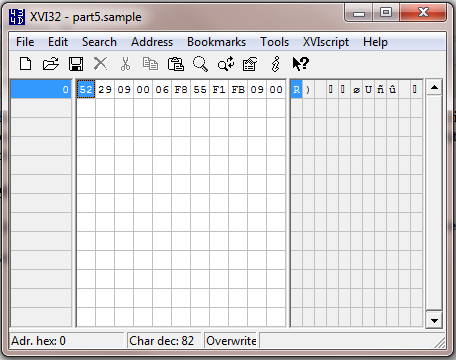
<p><img src="/Images/ReverseEngineeringPart5Image1.png" /></p>

<p>Once you have the file open in XVI32 you should see the hex and text values in the above screenshot.</p>

<p>To make this article more straightforward I’m going to tell you the actual structure of this file:</p>

<p><img src="/Images/ReverseEngineeringPart5Image2.png" /></p>

<p>Remember that there are 8 bits to a byte, so get the number of bytes in a 32 bit integer you divide 32 by 8 and get 4.</p>

<p>In this part of the practical, you need to answer four questions:</p>

<ol>
  <li>What is the decimal (base 10) value of the byte at offset 0?</li>
  <li>What is the decimal (base 10) value of the little-endian int16 at offset 1?</li>
  <li>What is the decimal (base 10) value of the big-endian int32 at offset 3?</li>
  <li>What is the decimal (base 10) value of the little-endian int32 at offset 7?</li>
</ol>

<h3 id="tips-for-the-struggling">Tips for the struggling</h3>

<p>If you struggle with question 1, reread part 2.</p>

<p>If you struggle with questions 2 or 4, reread part 4.</p>

<p>If you struggle with question 3, remember that the conversion is the same as for little-endian numbers only you don’t need to bother with reversing the order of the bytes.</p>

<h3 id="answers">Answers</h3>

<p>The answers can be found <a href="https://mvinetwork.co.uk/permanent/coreconcepts/part5answers.txt">here</a>. If you didn’t get the same answer, check out the tips above.</p>

<h2 id="changing-data-values">Changing Data Values</h2>

<p>Before starting this section, you need to make sure you’ve completed the questions above and got the correct answers to every question.</p>

<p>In this section, we want to change the values of the data entries encoded in this sample file. If you want to refresh your memory of making hex edits with XVI32, reread part 3 now. Remember to use overwrite mode in XVI32 rather than insert.</p>

<p>Again we have four exercises:</p>

<ol>
  <li>Change the value of the byte to 54 (expressed as a decimal integer)</li>
  <li>Change the value of the little-endian int16 to 40 (expressed as a decimal integer)</li>
  <li>Change the value of the big-endian int32 to EDA0 (expressed as a hexadecimal)</li>
  <li>Change the value of the little-endian int32 to 6767 (expressed as a decimal integer)</li>
</ol>

<p>If you struggle with any of these questions, the best idea is to reread the previous articles.</p>

<h3 id="answers-1">Answers</h3>

<p>The answers can be found <a href="https://mvinetwork.co.uk/permanent/coreconcepts/part5-answers.sample">here</a>. Open this file in XVI32 to compare against your own edits.</p>

<p>In this article you’ve determined the values of different data types and also changed those values. The skill you’ve just picked up means that you’re now able to hex edit a large range of data and files. Being able to determine the value of and edit data which occupies more than one byte is the most core practical skill in hex editing and reverse engineering binary files.</p>]]></content><author><name>Barnaby Smith</name></author><category term="Reverse Engineering" /><summary type="html"><![CDATA[In the last article I talked about some theory of how data types are stored in binary. Of particular importance were the concepts of endianness which defines the order of the bytes that make up a data type. This article will use XVI32 to practice determining and changing the values of data entries which make use of some of the data types we discussed in the last article.]]></summary></entry><entry><title type="html">Core Concepts Of Reverse Engineering: Part 3 – File Headers and Basic Hex Editing</title><link href="http://mvinetwork.co.uk/2012/02/04/core-concepts-of-reverse-engineering-part-3-file-headers-and-basic-hex-editing" rel="alternate" type="text/html" title="Core Concepts Of Reverse Engineering: Part 3 – File Headers and Basic Hex Editing" /><published>2012-02-04T00:00:00+00:00</published><updated>2012-02-04T00:00:00+00:00</updated><id>http://mvinetwork.co.uk/2012/02/04/core-concepts-of-reverse-engineering-part-3-file-headers-and-basic-hex-editing</id><content type="html" xml:base="http://mvinetwork.co.uk/2012/02/04/core-concepts-of-reverse-engineering-part-3-file-headers-and-basic-hex-editing"><![CDATA[<p>In the last post I discussed why hex editors are useful for working with binary files. I also talked about XVI32 my free hex editor of choice. During this series I will be using XVI32 for examples, so if you are not on a Windows machine or if you want to use a different hex editor then you will need to adapt my examples.</p>

<p>So if you haven’t done so already, <a href="http://www.chmaas.handshake.de/delphi/freeware/xvi32/xvi32.htm">download XVI32</a>. XVI32 doesn’t need installing, you can just unzip it and run it from there but you may want to copy it to a more memorable location and set up any relevant shortcuts.</p>

<p>In this post I’ll be taking more of a practical approach, I’ll start by talking about file signatures and then we’ll open up a few common file formats and take a look inside.</p>

<h2 id="file-signatures">File Signatures</h2>

<blockquote>
  <p>An extension does not make a type.</p>
</blockquote>

<p>Or to put it more clearly, just because a file has the extension .png doesn’t mean there’s actually a png image inside. This is a very important lesson, since it is incredibly common for games just to give a common file format a different extension. When I was browsing the Call of Duty 4 files I realised instantly when I opened a file format up in a hex editor that it was just a zip with a different extension, meaning I could unzip it and see the files inside.</p>

<p>So how did I realise it was a zip at a glance? What kind of technomagery is this? Many files have a signature at the very start saying what format they’re in. It doesn’t matter what the file is called or what extension it has, if it has a signature then you have a way of identifying the file type. These are often called magic numbers because a piece of text can be represented as a sufficiently long number. In fact, any and all data can be considered just a very, very long number, but I may be straying off the point.</p>

<p>There are a number of very common file signatures you’ll see, including:</p>

<table>
  <thead>
    <tr>
      <th>Signature</th>
      <th>Hex</th>
      <th>Type</th>
    </tr>
  </thead>
  <tbody>
    <tr>
      <td>MZ</td>
      <td> </td>
      <td>Executeable code (.exe)</td>
    </tr>
    <tr>
      <td>PK</td>
      <td>50 4B 03 04</td>
      <td>Compressed Zip (.zip)</td>
    </tr>
    <tr>
      <td>Rar!</td>
      <td> </td>
      <td>Compressed Rar</td>
    </tr>
    <tr>
      <td>BM</td>
      <td> </td>
      <td>Bitmap Image (.bmp)</td>
    </tr>
    <tr>
      <td> </td>
      <td>FF D8 FF E0 ** ** 4A 4649 46 00</td>
      <td>JPEG Image (.jpg, .jpeg)</td>
    </tr>
    <tr>
      <td>%PDF</td>
      <td>25 50 44 46</td>
      <td>PDF Document (.pdf)</td>
    </tr>
    <tr>
      <td>‰PNG</td>
      <td> </td>
      <td>PNG Image (.png)</td>
    </tr>
    <tr>
      <td>OggS</td>
      <td> </td>
      <td>Ogg Vorbis Media e.g. audio, video (.ogg)</td>
    </tr>
  </tbody>
</table>

<p>For a more extensive list of file signatures <a href="https://filesig.search.org/">check this page out</a>.</p>

<h2 id="some-examples">Some Examples</h2>

<p>Before continuing there are three examples you need to download, in the case of the images you will need to right click the link and hit “save as” or the equivalent option on your browser.</p>

<ul>
  <li><a href="https://mvinetwork.co.uk/permanent/coreconcepts/example1.png">Example 1</a></li>
  <li><a href="https://mvinetwork.co.uk/permanent/coreconcepts/example2.zip">Example 2</a></li>
  <li><a href="https://mvinetwork.co.uk/permanent/coreconcepts/example3.bmp">Example 3</a></li>
</ul>

<p>Now for each of the examples, I want you to open it up in XVI32 and have a look inside.</p>

<h2 id="example-1">Example 1</h2>

<p><img src="/Images/ReverseEngineeringPart3Image1.png" /></p>

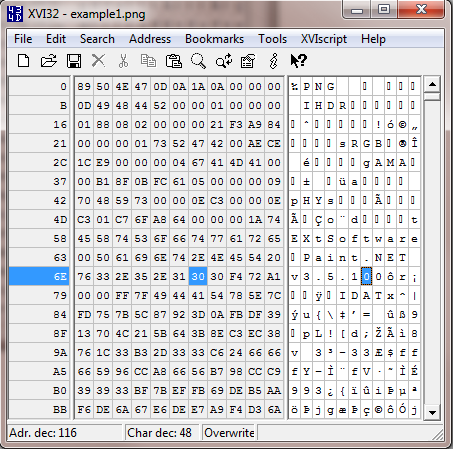
<p>Once we open the first example in XVI32 we see that the file header starts with the per mil symbol followed by PNG in the text view. This file clearly is a PNG image.</p>

<h2 id="example-2">Example 2</h2>

<p><img src="/Images/ReverseEngineeringPart3Image2.png" /></p>

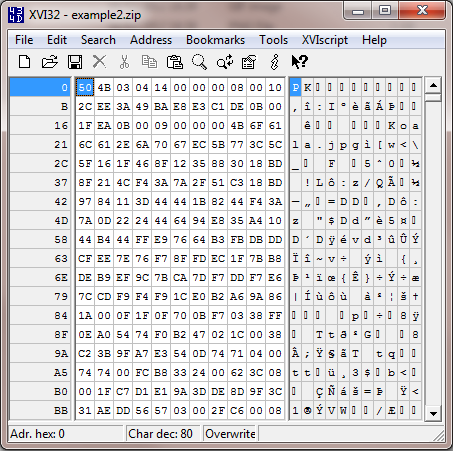
<p>With example two, we see that the file signature is PK (named after the format’s author Phil Katz, but I often translate PK as Packed). This file is a zip as we can see in the table of signatures above.</p>

<h2 id="example-3">Example 3</h2>

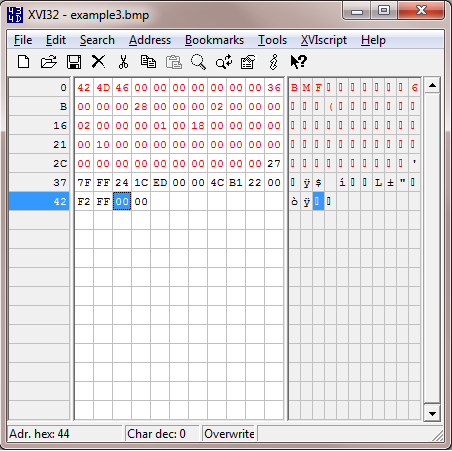
<p><img src="/Images/ReverseEngineeringPart3Image3.png" /></p>

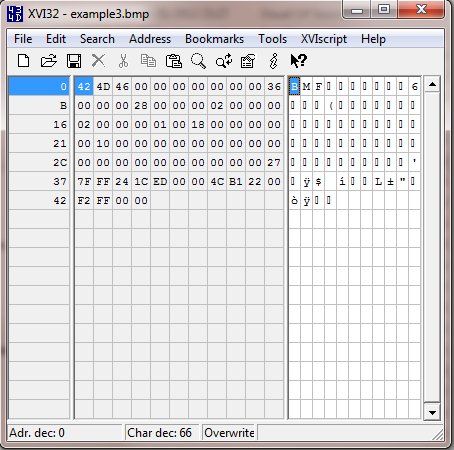
<p>The final example has the file signature BM and is therefore a bitmap image. Ignore the F, that byte is actually part of a variable in the bitmap format that says how big the file is.</p>

<h2 id="example-3-in-depth">Example 3 In Depth</h2>

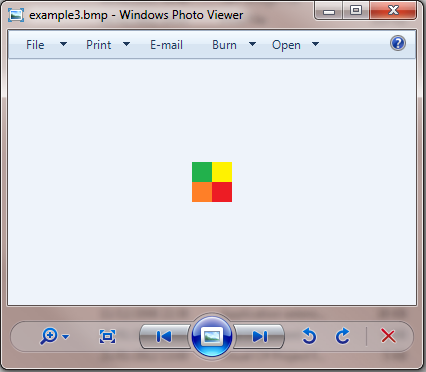
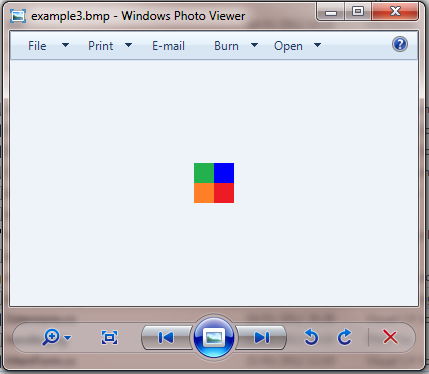
<p>Let’s take a deeper look at the third example now that you’ve got it open. We know that the file is a bitmap image, so let’s take a look at it in Windows Photo Viewer. It’s a small image so you’ll have to zoom in.</p>

<p><img src="/Images/ReverseEngineeringPart3Image4.png" /></p>

<p>If we open up the file in Paint, view it in Explorer or open its properties we’ll see the file is a 2 by 2 pixel image. I’ve created this small image to demonstrate the format more simply.</p>

<h2 id="file-headers">File Headers</h2>

<p>In addition to the file signature, most files have a file header which includes some basic information about the file. In the case of an image this may include its dimensions and colour depth/quality. In the case of audio this may be the duration, number of channels and bit rate.</p>

<p><img src="/Images/ReverseEngineeringPart3Image5.png" /></p>

<p>In the above image I’ve highlighted the file’s header. In the case of a Windows Bitmap the file header is 54 bytes long. To highlight a section in XVI32, select the first byte then select Edit -&gt; Block <n> chars and type 54 in decimal mode.</n></p>

<p>You can see a couple of 02’s in the header, so a reasonable assumption would be one represents width and one represents height. We can also see an 0x18 which as a decimal is 24, so another reasonable assumption is that this is the colour depth specifying 24 bit colour. For now don’t worry about colour depth, I’ll talk about colour in a dedicated article later in this series.</p>

<p>After the header we have 16 bytes. Now we know there are four pixels (2×2) pixels in the image, so it’d be sensible to assume that those four pixels are represented in these 16 bytes.</p>

<p>Opening the file in Paint, we can use the dropper tool to pick the colour of each pixel. By going to edit colour, we can then see the colour in its red, green and blue components. You can do this manually, or use the figures I’ve shown below. I’ve also converted the values to hex for you.</p>

<h2 id="top-left">Top Left</h2>

<table>
  <thead>
    <tr>
      <th>Decimal</th>
      <th>Hex</th>
      <th> </th>
    </tr>
  </thead>
  <tbody>
    <tr>
      <td>Red</td>
      <td>34</td>
      <td>22</td>
    </tr>
    <tr>
      <td>Green</td>
      <td>177</td>
      <td>B1</td>
    </tr>
    <tr>
      <td>Blue</td>
      <td>76</td>
      <td>4C</td>
    </tr>
  </tbody>
</table>

<h2 id="top-right">Top Right</h2>

<table>
  <thead>
    <tr>
      <th>Decimal</th>
      <th>Hex</th>
      <th> </th>
    </tr>
  </thead>
  <tbody>
    <tr>
      <td>Red</td>
      <td>255</td>
      <td>FF</td>
    </tr>
    <tr>
      <td>Green</td>
      <td>242</td>
      <td>F2</td>
    </tr>
    <tr>
      <td>Blue</td>
      <td>0</td>
      <td>00</td>
    </tr>
  </tbody>
</table>

<h2 id="bottom-left">Bottom Left</h2>

<table>
  <thead>
    <tr>
      <th>Decimal</th>
      <th>Hex</th>
      <th> </th>
    </tr>
  </thead>
  <tbody>
    <tr>
      <td>Red</td>
      <td>255</td>
      <td>FF</td>
    </tr>
    <tr>
      <td>Green</td>
      <td>127</td>
      <td>7F</td>
    </tr>
    <tr>
      <td>Blue</td>
      <td>39</td>
      <td>27</td>
    </tr>
  </tbody>
</table>

<h2 id="bottom-right">Bottom Right</h2>

<table>
  <thead>
    <tr>
      <th>Decimal</th>
      <th>Hex</th>
      <th> </th>
    </tr>
  </thead>
  <tbody>
    <tr>
      <td>Red</td>
      <td>237</td>
      <td>ED</td>
    </tr>
    <tr>
      <td>Green</td>
      <td>28</td>
      <td>1C</td>
    </tr>
    <tr>
      <td>Blue</td>
      <td>36</td>
      <td>24</td>
    </tr>
  </tbody>
</table>

<p>Now using the hex values worked out for each colour, we can spot them in the file. We can spot each three, in reverse order displayed as Blue, Green then Red. The reason for this different ordering is something I’ll talk about in a later article. We can also see that the bottom left pixel is first, followed by the bottom right pixel, then followed by two 00 bytes. Immediately after is the top left pixel, followed by the top right pixel and two more null (00) bytes.</p>

<p>Ignore the two sets of two null bytes, these are due to a nuance of a the bitmap format which means that it must pad the number of bytes representing a row of pixels to a multiple of 4 (so in this case we have 6 bytes representing a row, so it adds on 2 blank bytes to reach a total of 8 bytes and therefore a multiple of 4).</p>

<h2 id="editing-data">Editing Data</h2>

<p>So now that we know where the colour data is in the file, let’s try changing it.</p>

<p>Let’s pick the top right pixel, which is yellow. Let’s change it to blue. Right now its represented as 00 F2 FF, so since this is in Blue Green Red order rather than Red Green Blue, changing the value to FF 00 00 will be a strong blue. To edit the values select the first byte in the “00 F2 FF” sequence and make sure that it says Overwrite in the status bar. If it says Insert then tap the insert key once. The insert key toggles between Overwrite and Insert modes. Now simply type FF 00 00 on your keyboard and hit save.</p>

<p>Opening the file up in Windows Photo Viewer and zooming in, we now see that the top right pixel is blue.</p>

<p><img src="/Images/ReverseEngineeringPart3Image6.png" /></p>

<p>Congratulations, you have made your first successful and practical edit in a hex editor!</p>

<p>In this article, I’ve talked briefly about how to identify common file types regardless of their file extension. I’ve also shown some basic hex editing in a practical example – editing a bitmap image. In the next example I’m going to go into data types which combine multiple bytes to represent larger numbers.</p>]]></content><author><name>Barnaby Smith</name></author><category term="Reverse Engineering" /><summary type="html"><![CDATA[In the last post I discussed why hex editors are useful for working with binary files. I also talked about XVI32 my free hex editor of choice. During this series I will be using XVI32 for examples, so if you are not on a Windows machine or if you want to use a different hex editor then you will need to adapt my examples.]]></summary></entry><entry><title type="html">Core Concepts Of Reverse Engineering: Part 4 – Data Types</title><link href="http://mvinetwork.co.uk/2012/02/04/core-concepts-of-reverse-engineering-part-4-data-types" rel="alternate" type="text/html" title="Core Concepts Of Reverse Engineering: Part 4 – Data Types" /><published>2012-02-04T00:00:00+00:00</published><updated>2012-02-04T00:00:00+00:00</updated><id>http://mvinetwork.co.uk/2012/02/04/core-concepts-of-reverse-engineering-part-4-data-types</id><content type="html" xml:base="http://mvinetwork.co.uk/2012/02/04/core-concepts-of-reverse-engineering-part-4-data-types"><![CDATA[<h2 id="a-brief-intro">A Brief Intro</h2>

<p>The last post gave a practical example of hex editing. In the post before that I talked about bytes and hexadecimal numbers. This post continues that discussion of theory.</p>

<p>With regard to hexadecimal numbers, its important to note that you don’t need to be able to convert between hexadecimal and decimal in your head, or even on paper, using a calculator for the conversion is fine. All that’s important is to know that the same number can be written both as a decimal and as a hexadecimal. For example if I had a byte in my file which has the value AB, as a decimal this is 171. You may sometimes see numbers prefixed with 0x like 0xAB, this is simply standard notation for a hexadecimal number.</p>

<p>While being able to store a value up to 255 in a byte is useful, being able to store larger numbers is more useful. In this post, I shall discuss some basic types.</p>

<h2 id="signed-and-unsigned-numbers">Signed and Unsigned Numbers</h2>

<p>In mathematics, numbers can be either positive or negative. In computing, sometimes we’ll want numbers that can be either positive or negative, or sometimes we know that a number will always only ever be positive. Why differentiate the two you might ask? Storing whether a number is positive or negative takes up a small amount of data (specifically one bit). If all numbers were treated this way, we would be able to hold a smaller range of data even if we knew that data would never be negative, which while a small limitation is still wasteful.</p>

<p><strong>Signed numbers</strong> are numbers which can be considered to have a positive/negative sign information. Supporting negative  numbers comes at the expense of a smaller range of numbers that can be represented.</p>

<p><strong>Unsigned numbers</strong> are numbers which must be of the same sign (typically positive). These numbers can support a larger range but at the cost of not being able to store both positive and negative values.</p>

<h2 id="integers">Integers</h2>

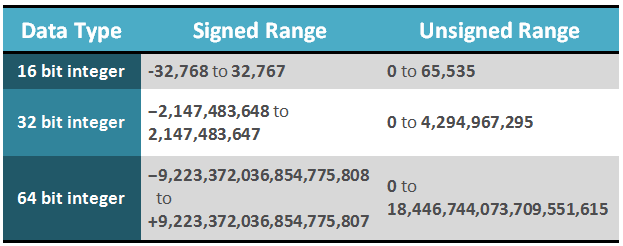
<p>Integers are one of the most basic and ubiquitous data types in computing. They represent whole numbers such as 1, 5, 98 and cannot store fractional numbers such as 0.24, 1.7, 5.5. Integers can be signed or unsigned and come in various sizes. The most common sizes of ints are 16 bit, 32 bit and 64 bit. The number of bits refers to the size that the integer occupies, there are 8 bits to a byte and therefore a 16 bit integer is 2 bytes and a 32 bit integer is 4 bytes. By combining bytes together we extend the range of the data type significantly, the more bytes there are the more variations that can be stored. In the table below I show the range of the above three types of ints as both signed and unsigned numbers.</p>

<p><img src="/Images/ReverseEngineeringPart4Image1.png" /></p>

<h2 id="littlebig-endian">Little/Big Endian</h2>

<p>When it came to writing say the number 123 as a hexadecimal byte, it was quite straight forward. We just worked out it was 7B using the calculator and that was it. If we now take the number 1234 which is bigger than the maximum value a byte can hold (255), we clearly now need to use an integer. So lets take a 32 bit integer which consists of four bytes. So if you put 1234 into your calculator and convert to hex you’ll get the result 4D2. If we stick some zeroes in front of it to occupy four bytes we would then get 00 00 04 D2. That’s great and this is a viable way of writing an integer however its not the only way.</p>

<p><strong>Big endian</strong> means that the high numbers come first and the low numbers come last. For example with 1234, it’s quite a small number compared to what a 32 bit int can hold so its on the right side. Larger numbers would occupy further numbers towards the left.</p>

<p><strong>Little endian</strong> numbers reverse the byte ordering so that the above example would be written as D2 04 00 00.</p>

<p>Its common for x86 architecture (PC) files and Intel Macs to be little endian and for PowerPC Macs and UNIX to use big endian. Particular file formats may choose to use little or big endian regardless of the architecture and operating system, however as a starting point I would assume the endianess matches the architecture.</p>

<p>In the case of Dune 2000 and most PC formats, files are stored in little endian. If you would like to read more about endianess try <a href="https://www.cs.umd.edu/class/sum2003/cmsc311/Notes/Data/endian.html">here</a>.</p>

<h2 id="converting-from-decimal-to-a-little-endian-32-bit-integer">Converting from decimal to a little endian 32 bit integer</h2>

<ol>
  <li>Convert to hex using calculator</li>
  <li>Prefix with ‘0’s until the number is represented as 4 bytes. (Has the structure 00 00 00 00).</li>
  <li>Reverse the bytes, each grouping is a byte. So 12 34 56 AB becomes AB 56 34 12</li>
</ol>

<h2 id="converting-from-a-little-endian-32-bit-integer-to-decimal">Converting from a little endian 32 bit integer to decimal</h2>

<ol>
  <li>Reverse the bytes, so AB 56 34 12 becomes 12 34 56 AB</li>
  <li>Convert to decimal using calculator</li>
</ol>

<h2 id="bit-representations-in-bytes">Bit Representations in Bytes</h2>

<p>A byte is made up of 8 bits. Each bit holds a 1 or 0 value, so a byte that holds the value zero can be represented as 00000000. The value that each digit represents doubles from right to left, starting at 1.</p>

<p><img src="/Images/ReverseEngineeringPart4Image2.png" /></p>

<p>Adding across we have zero lots of each number, so a byte with the bit representation 00000000 = 0
If we take a byte who’s bits have a value of 11111111 and use the above grid, we get:</p>

<p><img src="/Images/ReverseEngineeringPart4Image3.png" /></p>

<p>Adding across we get 128 + 64 + 32 + 16 + 8 + 4 + 2 + 1</p>

<p>Which if we add it up, we find that a byte with a bit representation of 11111111 is 255 – the max value of a byte. The number of bits is the reason for the number of variations a number can hold. Try continuing the table across to represent 16 bits rather than 8 bits, add up all the top row numbers and compare against the integer data type table above.</p>

<p>Let’s take another example:</p>

<p>A byte with bit representation 00110010</p>

<p><img src="/Images/ReverseEngineeringPart4Image4.png" /></p>

<p>Adding across again we get 32 + 16 + 2 = 50</p>

<h2 id="bit-fields">Bit Fields</h2>

<p>While the above usage of bits in a byte is the most common, it can be considered just one possible interpretation of the bits in the byte. Data only has meaning when we give it meaning. For example we could say rather than the right most bit representing the value 1, it could mean whether or not a tank can move onto a terrain tile. We could then say that the second to right byte which represents the value 2 can mean whether a player can build structures on this terrain tile. This usage of the bits in a byte is called a bit field. While bit fields are decreasing in usage now that data limits are getting higher and higher, they still have importance in many areas where small data sizes are critical.</p>

<h2 id="sub-byte-data-types">Sub-byte data types</h2>

<p>On a related note, you may want to hold more data than a simple true/false but want to use less data than a full byte. If say your maximum value was 15, then you’d only need 4 bits. You could then hold two different 4 bit variables in a single byte, one after the other. Alternatively, if you needed to hold a number with a ranger larger than a byte but smaller than 2 bytes, say a 12 bit number and you also wanted to hold a 4 bit number, you could combine the two by making use of 2 bytes. The first number occupying the first byte and the first half of the second byte, while the second number occupies the second half of the second byte. The below table shows the first number in red and the second number in green.</p>

<p><img src="/Images/ReverseEngineeringPart4Image5.png" /></p>

<h2 id="whats-next">What’s next?</h2>

<p>This post has been quite heavy in theory, in the next post I will explore data types through practical examples. So if you felt this was a lot to take in, don’t worry there will be opportunity to practice what I’ve talked about here and hopefully make sure you get your head around it.</p>]]></content><author><name>Barnaby Smith</name></author><category term="Reverse Engineering" /><summary type="html"><![CDATA[A Brief Intro]]></summary></entry><entry><title type="html">Core Concepts Of Reverse Engineering: Part 1 – Introduction</title><link href="http://mvinetwork.co.uk/2012/01/29/core-concepts-of-reverse-engineering-part-1-introduction" rel="alternate" type="text/html" title="Core Concepts Of Reverse Engineering: Part 1 – Introduction" /><published>2012-01-29T00:00:00+00:00</published><updated>2012-01-29T00:00:00+00:00</updated><id>http://mvinetwork.co.uk/2012/01/29/core-concepts-of-reverse-engineering-part-1-introduction</id><content type="html" xml:base="http://mvinetwork.co.uk/2012/01/29/core-concepts-of-reverse-engineering-part-1-introduction"><![CDATA[<p><img src="/Images/ReverseEngineeringPart1Image1.png" style="float: right; margin: 5px 0 5px 20px; width: 300px;" /></p>

<p>This is the first in a series of mini articles on reverse engineering binary files, particularly those in computer games but the majority of what I will discuss has applications in all areas of computer software. While I may touch on reverse engineering executable code, memory hacking and plain text formats, the majority of the focus is on actual binary files.</p>

<p>Since 2009 I’ve been reverse engineering and modifying the classic Westwood RTS Dune 2000. Despite being released in 1998, the modding community was held back by a limited number of tools. For example while it was possible to edit and make new multiplayer maps for the game, it was not possible to make campaign maps and missions. A couple of guys had been exploring the mission files and had made small, but significant, discoveries. This was when I joined the modding scene and since then I’ve reverse engineered a whole range of different files in the game and released a bunch of tools based on my research.</p>

<p>When I started, I had no reverse engineering experience. I’d never used a hex editor and had no idea about the binary representation of data. If you’re in the same boat, then don’t worry, in this series of articles I’m going to talk about what I’ve learned in terms of both conceptual theory and also practical techniques that I employ. This series of articles is particularly aimed at computer programmers with no reverse engineering experience and who would like to get started.</p>

<p>As with programming, the initiative is all on you. You will apply the theory and techniques to a different set of problems and formats than I did. As such you will need to extend and modify them to fit your needs and make a few leaps on your own to successfully reverse engineer a complex format. But if you start off small and work your way up, once you understand the basic theory you’ll find reverse engineering is actually very straight forward.</p>]]></content><author><name>Barnaby Smith</name></author><category term="Reverse Engineering" /><summary type="html"><![CDATA[]]></summary></entry></feed>